Prayk Wholesale: orders, per-customer pricing and the credit ledger on one screen
Wholesale trade is not the same as a classifieds feed. A wholesaler's customer is not a passer-by but a district shop that buys dozens of times a year. That is why Prayk Wholesale is a separate module: not a listing board, but the seller's working tool.
The problem: the same conversation fifty times a day
Every wholesaler at the Sadarak market knows the routine. New stock arrives, photos go into the group, but without prices — because the price differs per customer and nobody should learn their neighbour's rate. Then the phone starts: each customer calls separately, asks for their price, dictates the order as a voice message, and the seller writes it into a notebook or keeps it in mind. Goods leave on the district van; the money often stays behind as credit, recorded on one side only.
The key decision: the system is one-sided
The most important design decision: the district customer installs nothing and fills in nothing. They call or message as before, and the wholesaler records everything. The customer sees the result through a link: the receipt and the account statement arrive on WhatsApp and open in a browser with no login and no password.
That sets the quality bar too. If recording an order takes longer than 20 seconds, the paper book is faster and the system will not stick. So the order, payment and new-customer dialogs run entirely from the keyboard.
The workspace: four views, one screen
The Wholesale section of the cabinet has three panes: navigation and filters on the left, the selected view in the middle, the selected customer or order on the right. The right pane never opens a new page — it fills in place, so context is never lost.
- Today — the work queue: overdue calls, today's tasks, orders to pick, orders in transit, customers overdue by more than 30 days, customers who have gone quiet.
- Board — order cards in stage columns: new, confirmed, picking, in transit, delivered. Dragging a card changes its status.
- Table — dense rows, sortable columns, inline editing, keyboard navigation.
- Customers — ready-made segments: debtors, overdue past 30 days, quiet, newly joined, with an open task.
Pricing: four rungs, the first match wins
The system resolves a price top-down through four rungs: 1) a price written for this customer, 2) a product price for their tier, 3) the tier's percentage discount, 4) the base price. Example: base 12 manat, the customer sits in the «Regular» tier at 5% off, but 10.50 is written specifically for them — 10.50 wins.
The rule that governs everything: prices never leak between customers. A customer's response carries only their own price — neither the base price nor anyone else's. The wholesaler sees the full matrix on one screen.
The credit ledger: age matters more than amount
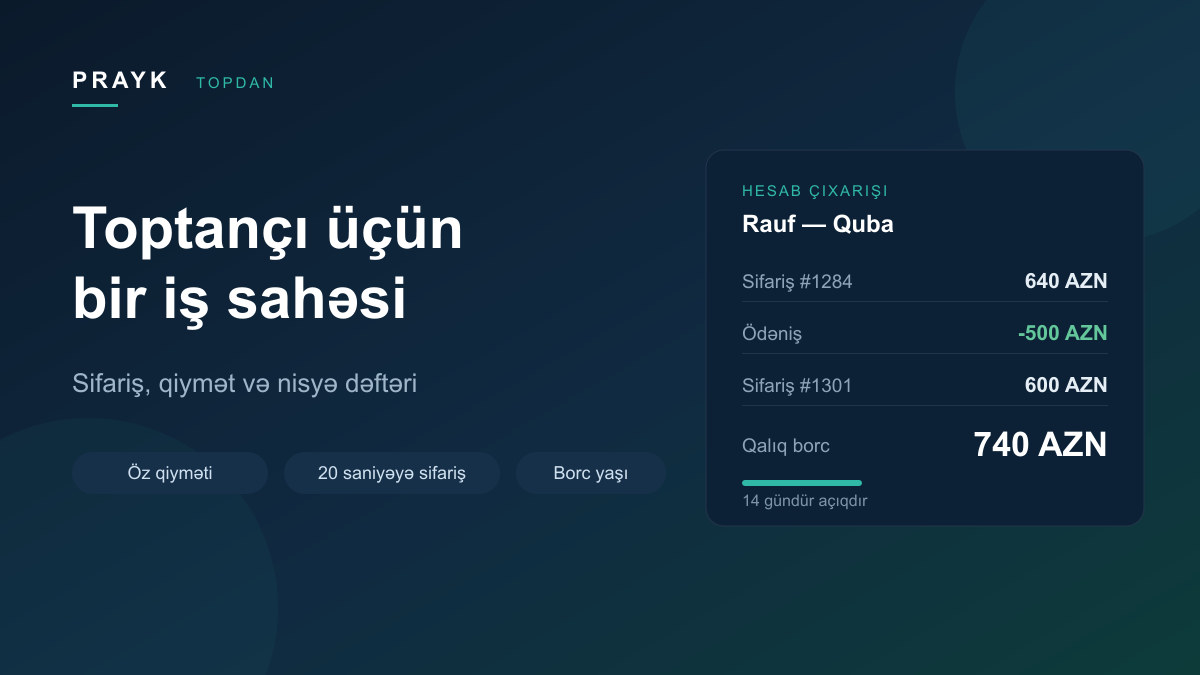
Every order raises the balance, every payment lowers it, and each line records the running total. If a customer owes 1,240 manat and pays 500, both sides immediately see 740.
But the real question is not «how much» — it is «how many days». So debt is grouped by age: 0–7 days, 8–30, 31–60 and over 60. The age counts from the moment the balance last reached zero, so a partial payment does not reset it.
What the customer gets: a link, not an app
The wholesaler taps «Send statement»: ready text with a link appears and WhatsApp opens. The customer taps the link and sees their account — outstanding balance, recent movements, the seller's phone number. Orders work the same way through a receipt: what shipped, at what price, the total and the current balance. It replaces the paper receipt and prints cleanly.
The link is read-only, cannot be used to place an order and cannot be guessed. The wholesaler can revoke it and issue a new one at any time.
Customer memory: tags, notes, tasks, activity
- Tags — the seller's own segments: «Guba van», «pays on Friday», «handle with care».
- Notes — a dated feed with an author.
- Tasks — «call tomorrow», «chase the debt»; overdue ones are counted separately.
- Activity feed — orders, payments, notes and tasks on one timeline, assembled automatically.
Catalogue and the «new stock» broadcast
The catalogue is uploaded once: name, unit (piece, carton, roll, kg), units per carton, minimum order, base price, stock and photos. An Excel or CSV file imports as-is — the columns are recognised automatically. From a photo, the assistant proposes a name, group, unit and carton size; the seller only adds the price.
When new stock arrives, the selected items go out in one tap: the notification reaches the app, WhatsApp and Telegram. The notification text carries no price — each customer opens it and sees their own. A broadcast can be addressed to everyone, to one tier, or to selected customers.
Who it is for and how to start
The module is built for wholesale-market sellers: a pavilion, 20–300 regular customers across the districts, and a different price for each of them. If you already have a store on Prayk, open the mode in the Wholesale section of your cabinet. No store yet — create a store first.
Customers are added in two ways: by phone number (if the number is already on Prayk they are connected immediately) or with a join link you post once into your existing WhatsApp group. An open catalogue appears on the wholesale catalogues page; a closed one is visible only to your customers.
The module is in pilot: it is being run with the first wholesalers and refined from their feedback. To join or ask a question, get in touch.